
Ask about your rankings, answered from your own scans
Maprix AI reads the scans and profile audits in your account, explains what changed and suggests what to do next.
An assistant that starts from your numbers
General advice about local SEO is easy to find. What is hard is knowing which advice fits your own map, your profile and your competitors this week. Maprix AI starts from the data already in your account: the scans you ran and the profiles you audited.
Ask why a keyword slipped, how you compare with the businesses around you or what to do first, and the answer is built from that context. The same engine writes the summary at the top of every report and the reply drafts in Review Studio.
Where Maprix AI works
-
Ask about your data
Pick a scan or a profile as context and ask in plain words: why a rank dropped, what the profile is missing, what to do this week.
-
A summary on every report
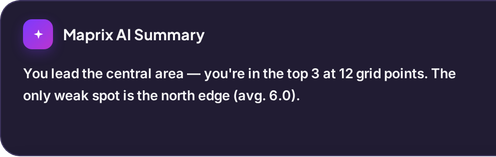
Each scan report opens with a short summary written only from that scan's data, followed by concrete next steps.
-
Drafts where you need them
Reply drafts in Review Studio and business update drafts in the profile audit, written for the review or profile in front of you.
Thank you for your feedback, Marta. We are glad you enjoyed the pizza, and we apologise for the long wait and for the lack of attention at your table. We have shared your comments with the team so that every guest is looked after promptly.
Thanks so much, Marta! Really glad the pizza hit the spot. Waiting 40 minutes with nobody checking on you is not okay, and we are sorry. We have talked it through with the team. Come back soon and let us make it right.
Thank you, Marta. Glad you liked the pizza, and sorry about the long wait. We are changing how we look after tables.
What you get
-
Answers from your account
Choose the scans and profile audits for your conversation, then ask Maprix AI to explain them and suggest next steps.
-
A plan and a weekly summary
Prioritised steps you can tick off one by one.
-
Chats that stay
Past conversations are kept in your account, so you pick up where you left off.
-
Questions to start from
Begin with prompts such as why a rank dropped or what to do this week, then ask your own.
Who it is for
-
Business owner
Get a plain explanation of a scan without learning the jargon first.
Explore the workflow -
Marketer
Turn scan results into a weekly list of tasks you can share.
-
Agency
Prepare client notes faster, starting from each client's own data.
Explore the workflow
Which plan
The plan we suggest for this feature. Every plan starts with a 7-day free trial.
Compare all plansPro
For owners and marketers tracking several locations
Monthly price: $49 $39 per month, billed annually
- 30,000 credits/mo
- 612 keyword scans on a 7×7 grid
$0 today. First charge on day 8; cancel any time before.
Frequently asked questions
What data does Maprix AI use?
The scans and profile audits in your account that you pick as context. Report summaries use only the data of the scan they belong to.
Does Maprix AI guarantee better rankings?
No. It explains your data and suggests steps; the result depends on the work done and on the competition in your area.
Are AI drafts included in every plan?
Yes. Review reply drafts and business update drafts are included on Solo, Pro and Agency.
Are my chats saved?
Yes. Past chats stay in your account so you can come back to them later.
Can I choose which data the assistant uses?
Yes. Select the scans and profile audits to use as context before asking your question. You can review those results separately in your account.
Other features
From the guides
- Local SEO: A Practical Checklist for Small BusinessesLocal SEO checklist for business owners: make profiles accurate, explain real services and locations, earn trust and measure changes consistently.
- Google Business Profile Optimization: A Working OrderGoogle Business Profile optimization in working order: which field to fix first, what each one actually does, and how to check whether the change worked.