
Audit your Google Business Profile in one run
Maprix reads your public profile, its reviews and your website, scores the profile out of 100 and lists what is costing you points.
A full read of the profile, not a checklist
The audit starts from what a customer sees on Google: the name, address, hours, photos, reviews and categories of your public profile. Each part is scored, and the score is split into five areas so a low number always points to a specific place.
It also looks past the profile. Your website is compared with the listing to find details that do not agree, recent business updates are counted, and the reviews feed straight into Review Studio. One run gives you the score, the reasons behind it and the list of what to do next.
What the audit checks
-
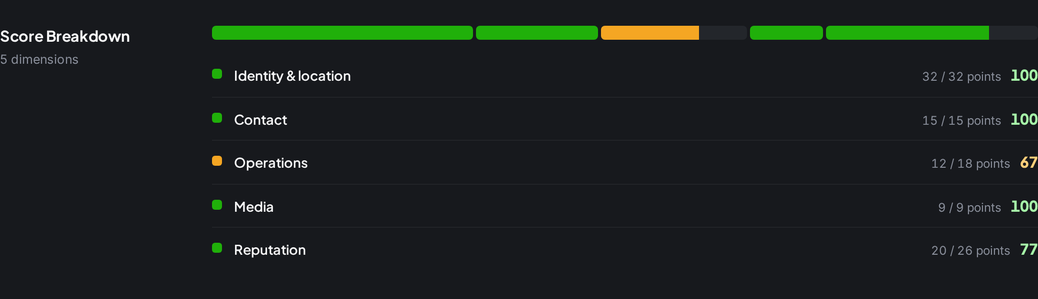
A score across five areas
Identity and location, contact, operations, media and reputation each carry points, so you see where the score comes from.
-
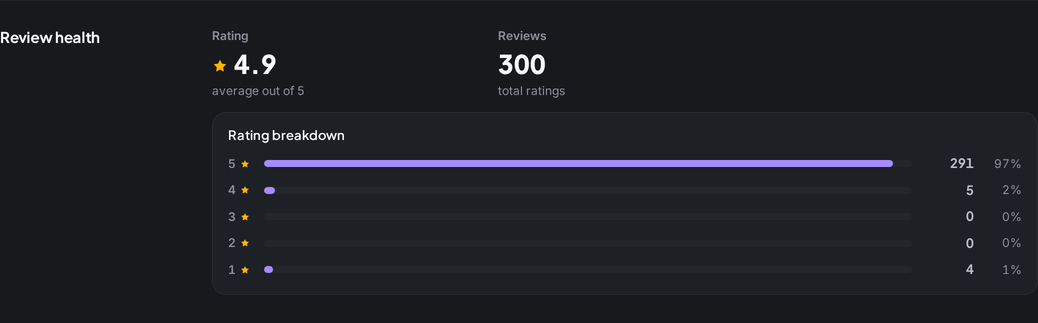
Review health
Average rating, total reviews and the star breakdown, read from the reviews on your profile.
-
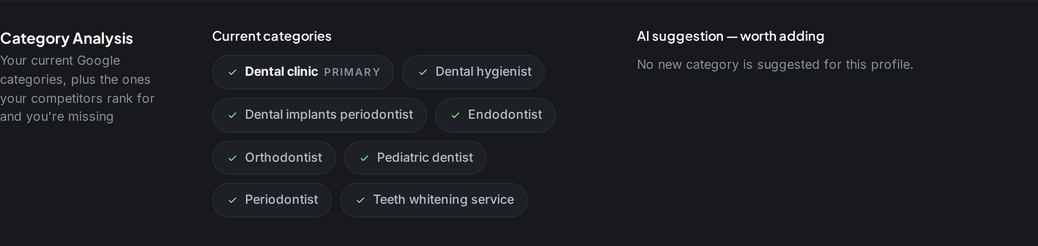
Current categories and AI suggestions
Review your current Google categories alongside AI suggestions for categories to consider for your business.
What you get
-
A score out of 100
One number you can follow over time, built from the points in five areas.
-
A list of what to fix
Every item that loses points is spelled out, so the next task is clear.
-
Website and profile match
The audit compares your website with the profile and flags the details where the two disagree.
-
Business updates
Recent updates on the profile are read and counted, and AI drafts help you write the next one.
-
Category suggestions
See your current categories and review AI suggestions against the services your business actually offers.
-
Straight into Review Studio
Reviews from the audit open in Review Studio, where unanswered ones wait for a reply draft.
Who it is for
-
Business owner
Find what your profile is missing before a customer notices it.
Explore the workflow -
Marketer
Turn a vague task like optimising the profile into a list with points attached to each item.
-
Agency
Audit a new client's profile on the first day and keep that score as the starting point.
Explore the workflow
Which plan
The plan we suggest for this feature. Every plan starts with a 7-day free trial.
Compare all plansSolo
For one business that wants to know where it really ranks
$19 per month, billed annually
- 10,000 credits/mo
- 100 full profile audits
$0 today. First charge on day 8; cancel any time before.
Frequently asked questions
What does the Google Business Profile audit check?
Five areas: identity and location, contact details, operations such as opening hours, media and reputation. It also reads reviews, categories, recent updates and how your website matches the profile.
Do I need to connect my Google account?
No. The audit reads the public profile, so you search for the business and pick it. Nothing on the profile is changed.
Does a high score guarantee better rankings?
No. The score measures how complete and consistent the profile is. Rankings also depend on distance, competition and other signals, which is why Rank Tracker measures them separately.
How many credits does an audit use?
100 credits per full audit. The pricing page shows how many audits each plan covers in a month.
Which plans include the audit?
Every plan includes profile audits. Monthly credits and audit limits vary by plan; the pricing page lists both.
Other features
From the guides
- Google Business Profile Optimization: A Working OrderGoogle Business Profile optimization in working order: which field to fix first, what each one actually does, and how to check whether the change worked.
- Google Business Profile Categories: Choosing the PrimaryYour primary category is the heaviest signal on your profile and the costliest mistake. How to choose it, use secondaries and change it safely.