
Respond to Google reviews without a blank page
Review Studio gathers the reviews of every profile you audit, puts the ones waiting for an answer first and writes a reply draft for each.
La pizza en sí estaba buenísima: la masa en su punto y los ingredientes frescos. Pero esperamos casi 40 minutos y nadie se acercó a nuestra mesa.
The pizza itself was great: the dough was just right and the toppings were fresh. But we waited almost 40 minutes and nobody came to our table.
Thank you for your feedback, Marta. We are glad you enjoyed the pizza, and we apologise for the long wait and for the lack of attention at your table. We have shared your comments with the team so that every guest is looked after promptly.
Thanks so much, Marta! Really glad the pizza hit the spot. Waiting 40 minutes with nobody checking on you is not okay, and we are sorry. We have talked it through with the team. Come back soon and let us make it right.
Thank you, Marta. Glad you liked the pizza, and sorry about the long wait. We are changing how we look after tables.
One inbox for the reviews of every profile
Replies are easy to postpone when every profile has its own screen. Review Studio puts the reviews of all the businesses you audit into one list, so the question is no longer where the reviews are but which one to answer next.
Filters bring the unanswered and negative reviews forward, a translation sits next to reviews written in another language, and the AI reply panel drafts an answer for the review you are reading. You choose the tone, copy the result and paste it into Google.
How it works
-
Pick a profile
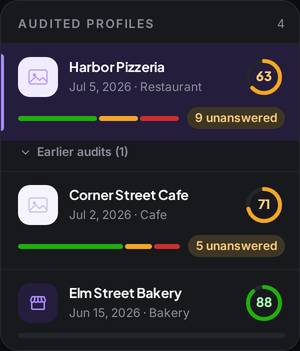
Every profile you have audited is listed with its score and the number of reviews still waiting for an answer.
-
Fetch more when you need it
The audit reads a first set of reviews. Fetch more of a profile's reviews when you need them; the credit cost is on the button.

-
Filter, read and reply
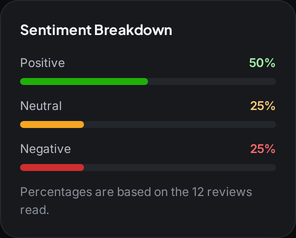
Filter unanswered, negative, neutral or positive reviews, check the sentiment split and draft a reply for the review in front of you.
What you get
-
Reply drafts in three tones
Formal, friendly or brief. Copy the draft as it is or ask for a rewrite.
-
Written for that review
Each draft is generated for the review it answers, not picked from a list of stock replies.
-
Automatic translation
Reviews in another language show a translation, and you can switch back to the original.
-
Unanswered first
Filter to the reviews still waiting for a reply and work through them one by one.
-
Sentiment at a glance
The split of positive, neutral and negative reviews you have read, next to the list.
-
Every profile in one place
Switch between businesses without leaving the studio.
Who it is for
-
Business owner
Answer reviews in a few minutes a week instead of putting them off.
Explore the workflow -
Marketer
Keep one voice across locations without writing every reply from scratch.
-
Agency
Handle review replies for several clients from a single screen.
Explore the workflow
Which plan
The plan we suggest for this feature. Every plan starts with a 7-day free trial.
Compare all plansPro
For owners and marketers tracking several locations
Monthly price: $49 $39 per month, billed annually
- 30,000 credits/mo
- 30,000 reviews read in Review Studio
$0 today. First charge on day 8; cancel any time before.
Frequently asked questions
Does Maprix post replies to Google for me?
No. You copy the draft and paste it into your Google Business Profile yourself. Nothing is posted on your behalf.
Which reviews appear in Review Studio?
Reviews from the profiles you audit. The audit reads a first set, and you can fetch more of a profile's reviews when you need them.
Can I change the tone of a reply?
Yes. Pick formal, friendly or brief, and ask for a rewrite if the first draft does not fit.
What happens with reviews in another language?
They are translated automatically. You can switch between the original text and the translation.
How are credits used?
Fetching reviews uses 1 credit per review, and the cost is shown before you fetch.
Other features
From the guides
- How to Get More Google Reviews: Link, QR Code and TimingGet your Google review link, turn it into a QR code, ask at the right moment and make it routine: more reviews with no incentives or filtering.
- How to Respond to Google Reviews: Templates That WorkReply templates for positive, negative and suspected fake Google reviews: a four-part structure, filled-in examples and the five mistakes to avoid.