
Local rank tracker for Google Maps
Maprix searches Google Maps from every point of a grid around your business and shows your real position at each one, on mobile and on desktop.
Desktop: Avg. rank 5.6, Visibility 80.3%, Found in 49 of 61 valid points, Top 3 coverage 16/61.
Check your Google Maps ranking across the area
A single rank check tells you where you appear from one spot. Customers search from across the area, and the list they see can change from one street to the next. Rank Tracker lays a grid over your area and runs the search from each point. The result shows your position at those sampled locations.
Each point keeps its own rank. Average rank uses the points where the business was found; visibility is the percentage of valid points where it appeared in the top 20. Top 3 coverage uses those same valid points. Errors are excluded from the denominator. Desktop and mobile have separate results.
See the dated example report to follow these calculations on a real scan. It explains why similar average ranks can sit alongside very different coverage figures and what an individual public report contains.
For ongoing local rank tracking, save the setup in Auto Tracking and choose when to repeat the scan. Open two dates in Reports to compare the same points. The geo-grid guide explains how to choose the area and spacing for a useful baseline.
How it works
-
Pick the business and keywords
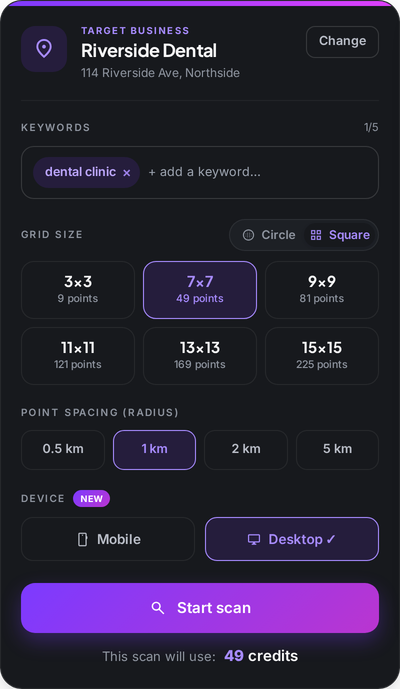
Search for the business, add up to five keywords, then choose the grid size, the spacing between points and the device.
-
One search per grid point
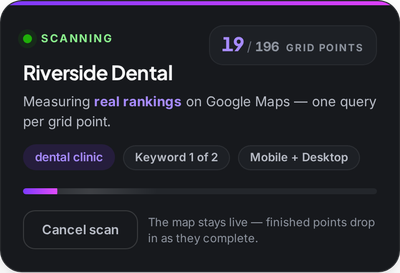
Each point is a separate Google Maps search. Finished points drop in while the rest of the grid is still running.
-
Read your rank, then compare
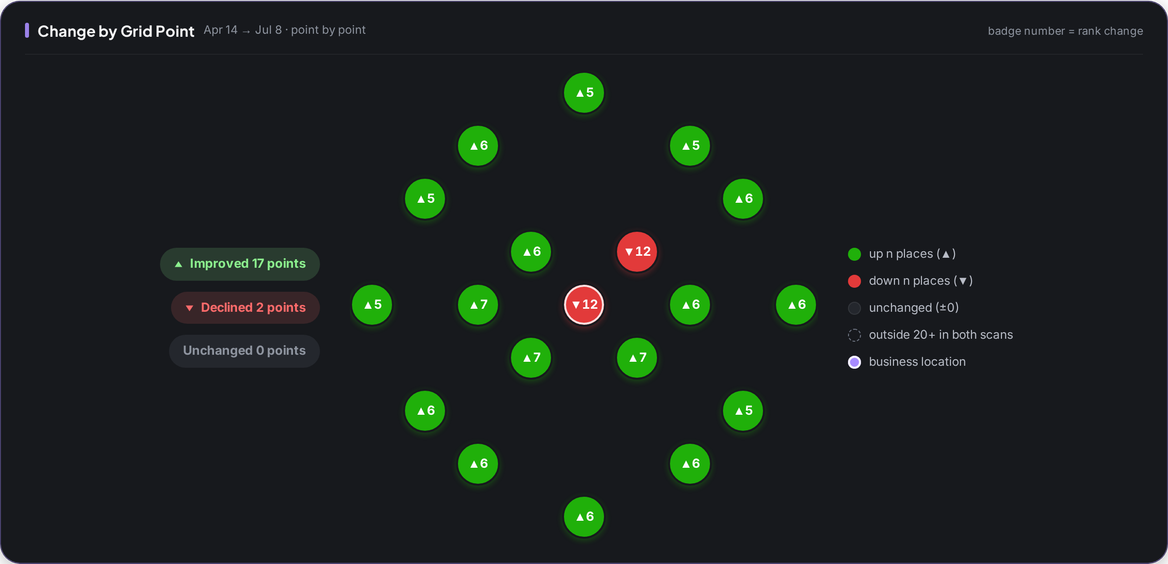
Average rank, visibility and top 3 coverage come per device. Scan again later and see which points moved and by how much.
What you get
-
Grids from 3×3 to 15×15
Square or circular patterns with 0.5 to 5 km between points. Solo scans up to 61 points, Pro 169, Agency the full 15×15.
-
Mobile and desktop, measured apart
The same search can return a different list on each device, so each gets its own rank instead of one average.
-
Rank bands at a glance
Valid points are grouped as 1–3, 4–10, 11–15, 16–20 or not found in the top 20. The distribution describes sampled points; measurement errors are shown separately.
-
Visibility and top 3 coverage
Visibility is the percentage of valid points where you appear in the top 20. Top 3 coverage uses the same valid points and counts appearances in the first three.
-
Competitor panel
See which businesses rank ahead of you across the scanned area and compare them from one list.
-
Scan history in your account
Every scan is kept, so you can reopen it later or put two dates side by side in Reports.
Who it is for
-
Business owner
Find out whether customers a few streets away can find you, not only the ones next door.
Explore the workflow -
Marketer
Measure several locations and keywords the same way and see what changed after each round of work.
-
Agency
Repeat each client's grid and compare dates inside your account. Share an individual scan as a public link or image; the link does not expose your account's scan history.
Explore the workflow
Which plan
The plan we suggest for this feature. Every plan starts with a 7-day free trial.
Compare all plansPro
For owners and marketers tracking several locations
Monthly price: $49 $39 per month, billed annually
- 30,000 credits/mo
- 612 keyword scans on a 7×7 grid
$0 today. First charge on day 8; cancel any time before.
Frequently asked questions
What is a local rank tracker?
A tool that tracks search rankings for selected locations. Products can cover Maps, local packs or organic website results. Maprix measures Google Maps results from multiple points on a grid, with mobile and desktop measured separately.
Why do mobile and desktop results differ?
The two devices can return different lists for the same search, so a single rank would hide the gap. Maprix measures them as two separate scans and reports a rank for each.
How many keywords can I scan at once?
Up to five keywords per scan. Each keyword is measured on every point of the grid you choose.
How are credits used?
One credit per grid point, per keyword and per device. The setup screen shows the total before you start the scan.
Does Maprix change my ranking?
No. Maprix measures and reports. It does not edit your Google Business Profile or post anything on your behalf.
Can I track rankings automatically?
Yes. Auto Tracking runs the same scan on a schedule and emails a summary when it finishes, daily, weekly, every other week or monthly on every plan.
Other features
From the guides
- How to Read a Local Rank Report: A Real Maprix ExampleRead a real local rank report: compare average position, coverage and device results, understand missing points, and plan a consistent follow-up scan.
- Local Rank Tracker: How It Works and How to Choose OneWhat a local rank tracker measures, how it differs from a classic rank tracker, how grid scans work, and the five things to check before you pay for one.