
Show what changed on the map, date by date
Compare saved scans in your account, then share a link to one selected scan. Export an image or a profile audit PDF with your logo.
Proof that holds up next to the map
A ranking claim is only as good as the measurement behind it. Reports keep every scan you run, so the history is already there when someone asks what changed: the trend across dates, the before and after, and the grid points that moved.
A public share link opens one selected scan in the browser. Your history and date comparison stay inside your account. Image export provides a visual for slides and messages; profile audits add a PDF under the Maprix name or your own logo.
How it works
-
See the whole portfolio
Average rank, visibility, top 10 rate and rank distribution across every business and keyword you scan.

-
Put two dates side by side
Pick a before and an after scan and compare average rank, visibility and the number of competitors.

-
See which points moved
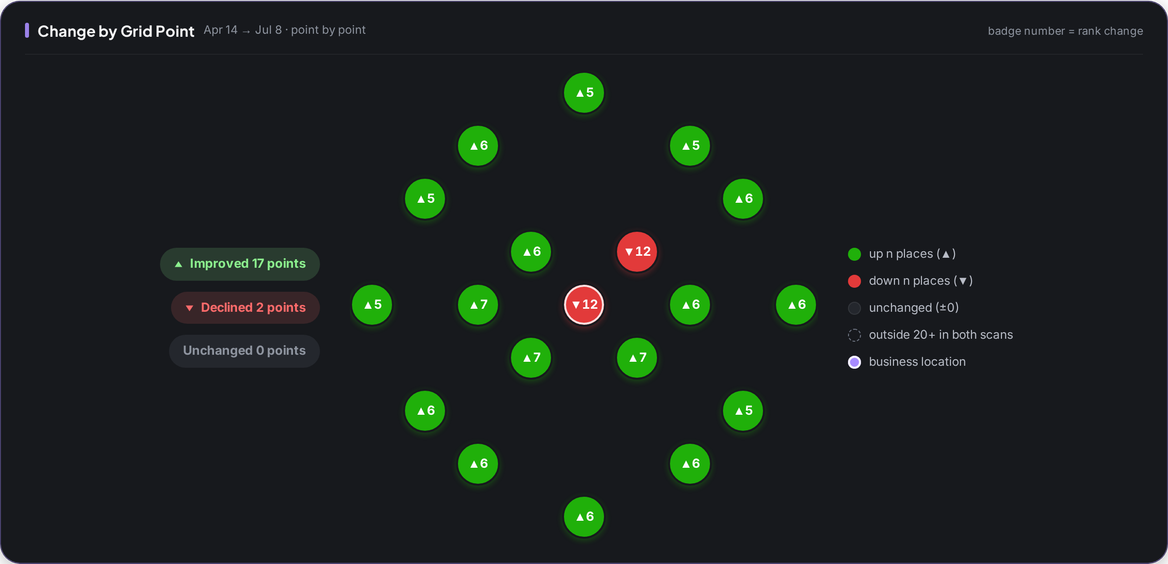
Every grid point shows how many places it gained or lost between the two scans.
What you get
-
Share links
Send a report as a link; the person opening it does not need an account.
-
Profile audits as a PDF
Download any profile audit as a Maprix PDF report.
-
Agency report with your logo
The audit PDF under your logo with no Maprix name, on every plan for 30 credits.
-
Trend over time
Every scan of the same business and keyword lands on one chart.
-
An AI summary on top
Each report opens with a short summary written from that scan's data.
-
Map view as an image
Download the report view as a PNG for slides or messages.
Who it is for
-
Business owner
Keep proof of what your work changed without building a spreadsheet.
Explore the workflow -
Marketer
Show before and after for each location in one place.
-
Agency
Send clients a share link every month, and an audit PDF under your own logo.
Explore the workflow
Which plan
The plan we suggest for this feature. Every plan starts with a 7-day free trial.
Compare all plansAgency
First credit tier
For agencies tracking many client businesses
Monthly price: $129 $99 per month, billed annually
- 90,000 credits/mo
- 1,836 keyword scans on a 7×7 grid
$0 today. First charge on day 8; cancel any time before.
Larger credit tiers are on the pricing page.
Frequently asked questions
Can clients open a report without an account?
Yes. A share link opens one selected scan in the browser, with no sign-up needed. Your scan history and the date comparison inside your account are not included in that public link.
What is a white-label PDF?
A profile audit PDF that carries your logo and no Maprix name. Every plan can create one for 30 credits.
Can I compare any two scans?
Pick two scans of the same business and keyword. The report shows the change in average rank, visibility, competitors and at every grid point.
Are old scans kept?
Yes. Scan history stays in your account, so the trend builds up over time.
Which plans include reports?
Every report feature is on every plan: share links, image export and both PDF versions. Plans don't differ on reporting.
Other features
From the guides
- Multi-Location Local SEO: Every Branch Is Its Own MapMulti-location local SEO in practice: keep branch profiles accurate, compare nearby locations with consistent settings, and read each branch's own history.
- How to Read a Local Rank Report: A Real Maprix ExampleRead a real local rank report: compare average position, coverage and device results, understand missing points, and plan a consistent follow-up scan.